পুরনো বাংলা লেখা আবার জীবন্ত করুন
একটা সহজ কাজের জন্য তৈরি: পুরনো বিজয় বা SutonnyMJ বাংলা লেখাকে পরিষ্কার ইউনিকোডে ফেরানো, যাতে সেটা ওয়েব, Word, ফোন আর সার্চে পড়া যায়।
একটা bijoy to unicode converter মানে পুরনো বিজয় বা SutonnyMJ-তে টাইপ করা একটা বাংলা ফাইলকে এমন লেখায় বদলানো, যেটা যেকোনো জায়গায় পড়া যায়, সঠিক ফন্ট ইনস্টল না থাকলেও। বাংলাদেশের প্রেস, NGO আর সংবাদপত্রের আর্কাইভে প্রায় প্রতিবারই একই দৃশ্য: পুরনো ফাইলটা খুললে শুধু এলোমেলো ইংরেজি অক্ষর আর চিহ্ন দেখায়।
এর কারণ হলো পুরনো ফন্ট প্রতিটা বাংলা বর্ণকে একটা 8-bit ANSI বাইট হিসেবে রাখে, আসল বাংলা code point হিসেবে নয়। এই পেজটা সেই লেখাটাকে ঠিক করে ইউনিকোড বাংলায় ফিরিয়ে আনে, কোনো sign-up নেই, আর আপনি যা paste করেন তার কিছুই সংরক্ষণ বা শেয়ার করা হয় না। নিচে চারটা বাস্তব কাজ ধরে ধরে দেখানো হয়েছে, ঠিক যেভাবে এই recovery মাঠে করা হয়।
চারটা আসল recovery কাজ, ধাপে ধাপে
প্রতিটা কাজের জন্য কী করবেন আর recover হওয়ার পর কী মিলিয়ে দেখবেন, বাংলাদেশের আর্কাইভ টেবিল থেকে সরাসরি।
ছাপা একটা বাংলা বই ডিজিটাইজ করা
OCR বা পুরনো DTP ফাইল থেকে পাওয়া পুরনো লেখা উপরের input panel-এ paste করুন, তারপর ফল টুকরো টুকরো করে নিন। যা মিলিয়ে দেখবেন: যুক্তাক্ষর (যেমন ক্ষ, ঞ্জ, স্ত্র), ই-কার আর ঈ-কারের পার্থক্য, আর অধ্যায়ের শিরোনামে ভুল লাইন-ব্রেক। বইয়ের লেখায় যুক্তবর্ণ বেশি থাকে, তাই পুরো অধ্যায় একসাথে না নিয়ে এক প্যারা আগে রূপান্তর করে চোখে মিলিয়ে নিন।
একটা পুরনো সরকারি বিজ্ঞপ্তি উদ্ধার করা
স্ক্যান করা বিজ্ঞপ্তি বা পুরনো office memo-র লেখা paste করুন। যা মিলিয়ে দেখবেন: স্মারক নম্বর আর তারিখ (বাংলা সংখ্যা যেমন ১২৩ আর ইংরেজি 123 আলাদা থাকে), দপ্তরের নাম, আর স্বাক্ষরকারীর পদবি। সরকারি নথিতে একটা ভুল সংখ্যাও বড় সমস্যা, তাই উদ্ধার করা লেখাটা মূল কপির পাশে রেখে প্রতিটা নম্বর মিলিয়ে নিন।
একটা সংবাদপত্রের আর্কাইভ অনলাইনে আনা
পুরনো PageMaker বা সংবাদপত্রের কলামের লেখা ছোট ছোট ভাগে রূপান্তর করুন, পুরো পেজ একসাথে নয়। যা মিলিয়ে দেখবেন: প্রতিবেদকের নাম, স্থান (datelines), উদ্ধৃতি চিহ্ন, আর কলামের মধ্যে কেটে যাওয়া শব্দ। ইউনিকোড হয়ে গেলে পুরনো প্রতিবেদন গুগলে index হয় আর পাঠক সার্চ করে খুঁজে পায়, যেটা পুরনো ANSI বাইটে কখনোই হতো না।
একটা SutonnyMJ Word ফাইল ঠিক করা
Word থেকে লেখাটা plain text হিসেবে copy করুন (formatting ছাড়া), paste করুন, রূপান্তর করুন, তারপর ইউনিকোড বাংলা ফন্টে Word-এ ফিরিয়ে দিন। যা মিলিয়ে দেখবেন: টেবিলের ঘর, bullet আর numbered list, আর পুরনো styling থেকে আসা অতিরিক্ত space। লম্বা ফাইল হলে section ধরে ধরে করুন, যাতে heading আর page break ঠিক থাকে।
কেন ইউনিকোডই বাংলাকে সার্চ আর মোবাইলে খুলে দেয়
এখানে আসল কথাটা ডেটা আর ডিসপ্লে-র পার্থক্য। একটা পুরনো ফাইলে যা সংরক্ষিত থাকে সেটা বাংলা অক্ষর নয়, সেটা ANSI বাইটের একটা সারি, যেগুলো শুধু তখনই বাংলা দেখায় যখন একদম ঠিক legacy ফন্টটা ইনস্টল করা থাকে। সার্চ ইঞ্জিন, স্ক্রিন রিডার, বা একটা ডেটাবেস সেই বাইটগুলোকে বাংলা হিসেবে চেনে না, তাই লেখাটা ফাইলে থাকলেও সেটা কার্যত অদৃশ্য, খুঁজে পাওয়া যায় না, কপি করা যায় না।
ইউনিকোড ঠিক উল্টোটা করে: প্রতিটা বাংলা বর্ণের নিজের একটা স্থায়ী পরিচয় আছে। অক্ষর ক সবসময় code point U+0995, সে আপনি যে ফন্ট বা যে ডিভাইসই ব্যবহার করুন। তাই রূপান্তরের পর লেখাটা আর কোনো একটা ফন্টের ওপর নির্ভর করে না, গুগল সেটা পড়ে, ফোন সেটা দেখায়, আর আপনার পাঠক সেটা সার্চ করে খুঁজে পায়। এটাই কারণ যে শুধু ফন্টের নাম বদলে দিলে কাজ হয় না: ভেতরের বাইটগুলো এখনও legacy-mapped থেকে যায়, আর আসল recovery সেগুলোকে সত্যিকারের ইউনিকোড বাংলায় নতুন করে লেখে।
The numbers make the gap clear: the Unicode Bengali block defines 91 code points across the range U+0980 to U+09FF, covering 11 independent vowels and around 39 consonants, while a legacy ANSI font has only 256 byte slots for the entire alphabet. Bengali was standardised in Unicode back in 1991, and mainstream operating systems have shipped Bengali rendering by default since roughly 2003, so a recovered file reads on almost every phone and browser today with no extra font. For comparison, the original 7-bit ASCII set held just 128 positions, which is why every legacy Bangla font had to overload Latin byte slots in the first place.
How to recover an old file, step by step
The same careful order works every time, and it is what keeps a long file from hiding a small error in a name or date. Rushing a whole page at once is the usual mistake; short passes, proofed as you go, are far safer. Treating a bijoy to unicode converter as a careful recovery pass rather than a one-click button is what protects a name, a date, or a memo number inside a long government file. Here is the procedure to follow on any office or newsroom archive:
- Keep the original legacy file safe and open only a copy. Never edit the only source you have, because the old bytes are the ground truth if anything looks wrong later.
- Paste one short paragraph of the old text into the input panel above and read the recovered result beside the original.
- Check the recovered names, Bengali and English numbers, conjuncts, and line breaks against the source before trusting the rest.
- Once that short sample matches, process the remaining sections in small batches and copy each clean result into your final document.
- Before you publish, search a few recovered names and phrases inside the finished file to confirm the text is now indexable.
Whichever archive you are working through, the same habit holds: recover a duplicate, leave the legacy original untouched, and read the recovered names, figures, and dates against that original before the file leaves your hands for print or for the web.
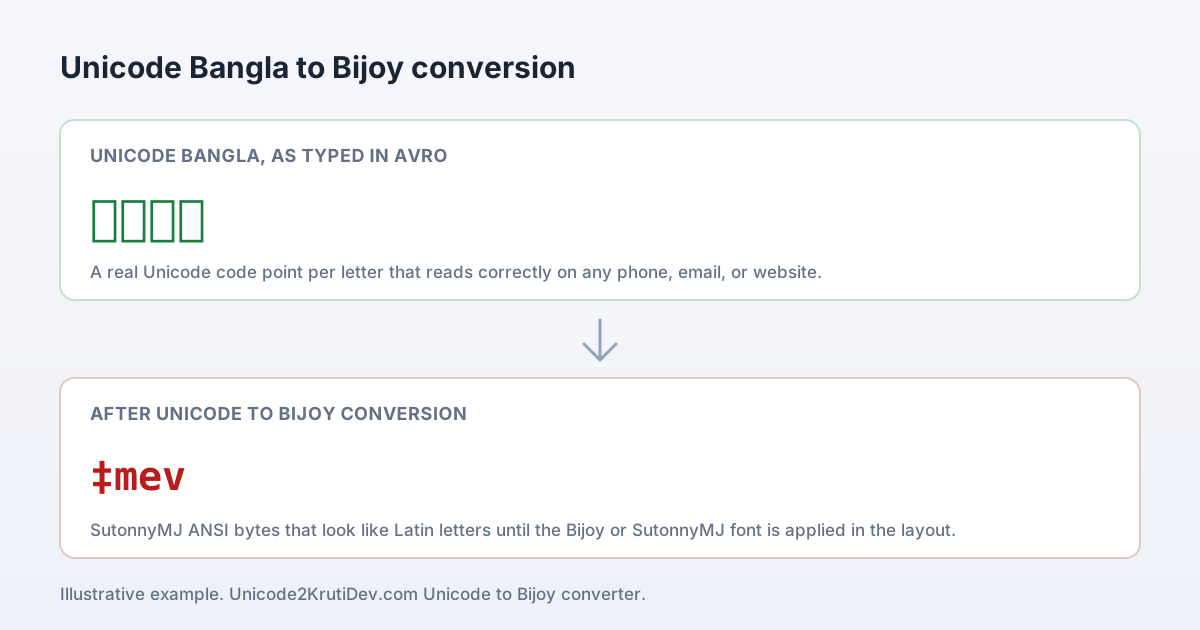
‡mev, যা ফন্ট ছাড়া এলোমেলো অক্ষর দেখায়, recovery মানে এই বাইটগুলোকে আবার বাঁ পাশের ইউনিকোডে ফিরিয়ে আনা।Common recovery problems, and the fix
পুরনো বাংলা ফাইল recover করার সময় বাংলাদেশে যে সমস্যাগুলো সবচেয়ে বেশি দেখা যায়, আর প্রতিটার সমাধান।
Problem: conjuncts break in two
পুরনো প্রেস ফাইলে যুক্তবর্ণ যেমন ক্ষ বা ঞ্চ মাঝেমধ্যে দুই টুকরো হয়ে বসে থাকে। রূপান্তরের পর সেগুলো আলাদা করে মূল কপির সঙ্গে মিলিয়ে দেখুন; ছোট অংশে recover করলে এটা সহজে ধরা পড়ে।
Common issue: dari and comma shift
দাঁড়ি (।) আর কমা পুরনো ANSI-তে অন্য চিহ্নের জায়গায় বসে যায়, তাই একটা বাক্য কোথায় শেষ হলো তা বদলে যেতে পারে। প্রতিটা বাক্যের শেষ আর বিরামচিহ্ন মূল লেখার সঙ্গে মিলিয়ে নিন।
PDF copy fails on spacing
কপি-করা PDF-এ লুকানো অতিরিক্ত space লাইন ভেঙে দেয়। Word থেকে plain text হিসেবে copy করুন, input box-এ স্পষ্ট ভাঙা space ঠিক করুন, তারপর recover করুন, ইংরেজি আউটপুটে নয়, উৎসেই ঠিক করুন।
Mixed Bangla–English looks wrong
recovery শুধু legacy বাংলা বাইটগুলোকেই নতুন করে লেখে; Latin অক্ষর, ০-৯ ইংরেজি সংখ্যা, URL আর email ঠিকানা যেমন ছিল তেমনই থাকে। তাই "স্মারক নং ০৫, Ref: ABC/2026"-এর মতো মেশানো লেখা পরিষ্কার থাকে, কোনো অংশ হারায় না।
Table cells merge after paste
পুরনো টেবিলের ঘর কখনো একসাথে জোড়া লেগে যায়। লম্বা ফাইল section ধরে ধরে recover করুন আর প্রতিটা টেবিল আলাদা করে গন্তব্য document-এ বসান, যাতে ঘরগুলো ঠিক থাকে।
Stray Latin letters remain
একটা passage-এ এখনও ইংরেজি অক্ষর মিশে থাকলে সেটা সম্ভবত কম-পরিচিত একটা legacy font থেকে এসেছে। সেই অংশটা আলাদা করে আবার convert করুন আর মূল লেখার সঙ্গে লাইন মিলিয়ে দেখুন।
Privacy, and why Bangladesh offices trust this
A bijoy to unicode converter is a read-and-recover step only. The text you paste is processed for the result you see and is not stored, logged, or sent anywhere afterwards, which is why offices in Bangladesh use it for confidential memos, salary sheets, and unpublished notices. The rule for binding documents never changes: keep the legacy original, recover a copy, and proof the names and numbers before you publish.
It helps to know what a clean result looks like. A recovered paragraph reads as ordinary Bengali, with whole conjuncts, correct vowel signs, and spaces in the right places. If you still see stray Latin letters mixed into Bengali words, that passage was not fully recovered, usually because it came from a less common legacy font, so convert that one passage again on its own and compare it against the original line.
For a sensitive file, it helps to picture a bijoy to unicode converter as a quiet desk worker rather than a machine: it reads the old bytes, hands back clean letters, and keeps no copy of what passed through. The discipline that protects a record is yours, not the tool's.
পুরনো একটা প্রশ্ন প্রায়ই আসে, "৩০ বছরের আর্কাইভ কি সত্যিই কাজে লাগবে?" বাংলাদেশে আনুমানিক ১৬ কোটি মানুষের ভাষা বাংলা, আর সংবাদপত্র, সরকারি দপ্তর আর প্রকাশনার বিপুল ইতিহাস এখনও পুরনো legacy ফাইলে আটকে আছে। সেই লেখা একবার ইউনিকোডে এলে গুগল তা index করে, পাঠক সার্চ করে খুঁজে পায়, স্ক্রিন রিডার পড়ে শোনায়, আর গবেষক উদ্ধৃত করতে পারেন, যা কোনোটাই পুরনো ANSI বাইটে সম্ভব ছিল না।
যাচাই করার মতো নির্ভরযোগ্য সূত্র
এই পেজের প্রতিটা encoding দাবি নিচের প্রকাশিত মানদণ্ডের সাথে মিলিয়ে দেখা যায়।
এই তিনটা সূত্র দেখায় কেন একটা legacy-to-Unicode রূপান্তর শুধু চেহারা বদলায় না, বরং পুরো encoding বদলে দেয়: Bengali block-এ ৯১টা সংজ্ঞায়িত code point আছে (U+0980 থেকে U+09FF), যেখানে একটা পুরনো ANSI ফাইল পুরো বাংলা বর্ণমালাকে মাত্র ২৫৬টা বাইটের মধ্যে ঠেসে রাখে।