Unicode to Bijoy Converter

Convert Bangla Unicode into Bijoy or SutonnyMJ ANSI for press, DTP, and forms. বাংলা ইউনিকোড থেকে বিজয়।

Unicode Bangla text (paste/type)
Bijoy output

ছাপা, ডিটিপি ও সরকারি কাজের জন্য

বাংলায়: ইউনিকোড থেকে বিজয় কনভার্টার

আপনার বাংলা লেখা আধুনিক ইউনিকোডে আছে, কিন্তু প্রেস বা পুরোনো টেমপ্লেট চায় বিজয় ফন্ট। এই ইউনিকোড টু বিজয় কনভার্টার সেই সেতু তৈরি করে।

বিজয় হলো বাংলাদেশের সবচেয়ে পরিচিত লিগ্যাসি বাংলা ANSI ফন্ট, যা 1988 সাল থেকে সংবাদপত্র, বইয়ের ছাপা, সরকারি নোটিশ ও ডিটিপি ফাইলে ব্যবহার হয়ে আসছে। বাংলাদেশের 16 কোটির বেশি মানুষের বহু পুরোনো ফাইল এখনও ইউনিকোড নয়, বিজয় ম্যাপিং প্রত্যাশা করে।

আপনি যদি আধুনিক ইউনিকোডে বাংলা লেখেন কিন্তু কোনো প্রেস, পুরোনো ওয়ার্ড টেমপ্লেট বা ডিজাইন ফাইল বিজয় ফন্ট চায়, তাহলে এই কনভার্টার ব্যবহার করুন। লেখা পেস্ট করুন, রূপান্তর করুন, আউটপুট কপি করে গন্তব্য অ্যাপে বিজয় বা SutonnyMJ ফন্ট প্রয়োগ করুন। Bijoy, Bijoy 52 ও SutonnyMJ, এই 3টি ম্যাপিং সবচেয়ে বেশি দেখা যায়।

মনে রাখবেন, ফন্ট পরিবর্তন আর রূপান্তর এক নয়। শুধু বিজয় ফন্ট বসালেই ইউনিকোড লেখা ঠিক হয় না, কারণ অক্ষরের ম্যাপিং আলাদা। সঠিক রূপান্তরের পর নাম, তারিখ, সংখ্যা ও যুক্তাক্ষর মূল লেখার সঙ্গে মিলিয়ে নিন, বিশেষ করে সরকারি বা ছাপার কাজের আগে।

Bangla unicode to bijoy keyboard reference

Use this rough pad to type or practice Unicode Bangla characters. The converter panel at the top handles the actual conversion.

Bangla
keyboard

Click any key to add its Bangla glyph to the rough pad. This Bangla pad is for practice only and never feeds the converter input.

Bangla glyph typing hint
Practice pad Never feeds the converter input
a
aa
i
ii
u
uu
e
oi
o
ou
t
k
kh
g
gh
ng
c
ch
j
jh
ny
য়y
T
D
t
d
n
p
b
m
r
l
s

Maintained by together with the Unicode2KrutiDev team. The Bijoy and SutonnyMJ byte mappings are checked against the published Bengali code chart and real press files.

What a unicode to bijoy converter actually produces

It produces Bijoy or SutonnyMJ ANSI text, the legacy keystroke-mapped Bangla that Bangladesh's press desks, DTP houses, and many government forms still treat as their native format. Modern Bangla you type in Avro or Ridmik is stored as Unicode; a press template built for Bijoy expects bytes, not code points. Paste your Unicode বাংলা above, take the Bijoy-ready output, and it slots into the legacy layout the moment you apply the Bijoy or SutonnyMJ font. Nothing you paste is stored or shared, so confidential tenders and notices stay private. Because the unicode to bijoy converter runs entirely in your browser, the Bangla you paste never leaves your device. No text is uploaded to a server, nothing is logged anywhere, and simply closing the tab clears everything you pasted from memory.

Plain-language glossary

The Bijoy vocabulary, defined

Eight terms that come up the moment a Bangla file has to cross from the modern web into a legacy press layout. Learn these and the rest of the page reads easily.

Bijoy
The keyboard-and-font system Mostafa Jabbar released in 1988, before any operating system understood বাংলা natively. It places Bengali glyphs onto the 256 byte slots an 8-bit Latin font would normally use.
SutonnyMJ
The signature Bijoy-family typeface, the most widely installed of them all, which is why so many archived files are SutonnyMJ rather than Bijoy proper. Same ANSI layout, different name in the font menu.
ANSI / 8-bit mapping
A scheme that stores each Bangla letter as one of 256 byte positions. Type the key mapped to "k" and the font draws "ক"; the text on disk is Latin bytes, and only a Bijoy font makes it look like Bangla.

The Unicode side, and the print-shop terms

Unicode code point
A true, fixed identity for a letter. In Unicode, "ক" is always U+0995 regardless of font or device, which is why Unicode text is portable, searchable, and renders without installing anything.
Bengali block (U+0980–U+09FF)
The 128 reserved code points where Unicode defines every Bangla letter, vowel sign, and nasal mark. The script first appeared in Unicode 1.0 back in 1991.
Avro
The open-source phonetic input method, released in 2003, that made Unicode Bangla typing effortless for ordinary writers and pushed everyday Bangla onto the Unicode side of the divide.
RIP
The raster image processor at a print shop. If the Bijoy font is only referenced and not embedded or outlined, the RIP can substitute a default face and scramble the glyphs, so outline before final output.
Reph and যুক্তাক্ষর
The reph (র্, an r-sound riding above a consonant) and conjunct clusters. These are the script's moving parts and the first place a conversion needs proofing.

Why these terms add up to "a font swap cannot work"

The glossary is the whole reason a font swap fails. An 8-bit font has only 256 positions, while the Bengali block defines 128 code points, so the two systems cannot share the same numbering. Changing a Unicode document's font to SutonnyMJ in Word repaints the glyphs but never touches the stored U+09xx code points, so the font draws nonsense. The text has to be rewritten from code points into the matching Bijoy byte positions first, which is exactly what a unicode to bijoy converter does, and only then does the legacy font display correct বাংলা.
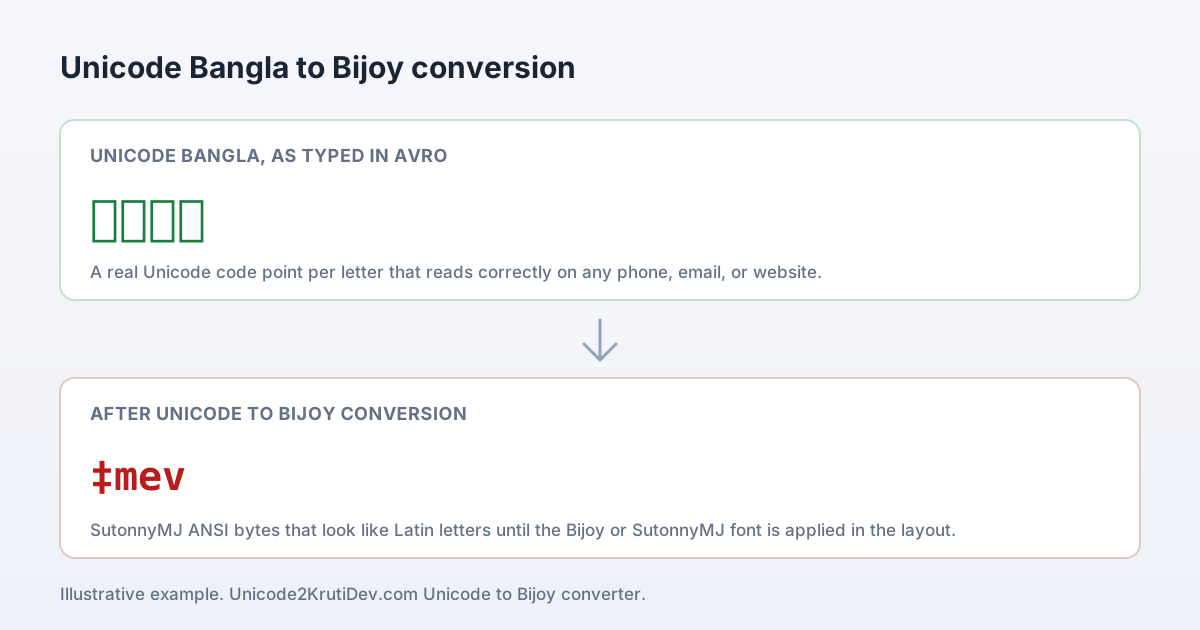
Unicode to bijoy conversion example: the Unicode Bangla word সেবা on the left, its Bijoy SutonnyMJ ANSI bytes (‡mev) on the right
Left: the Unicode বাংলা word সেবা as typed in Avro, where each letter is a real code point. Right: the same word after the unicode to bijoy converter, now the SutonnyMJ ANSI bytes ‡mev that render as সেবা once the Bijoy or SutonnyMJ font is applied in the press layout.

Step by step

Running the conversion the careful way

  1. Copy your বাংলা from wherever it reads correctly today, such as Word, Google Docs, or a Messenger thread, where it is already stored as Unicode.
  2. Paste it into the left input panel at the top of this page; the Bijoy ANSI output forms on the right as each code point is rewritten into its byte position.
  3. Use Copy for MS Word for a layout app, or plain Copy for a text field, then paste into the destination with Ctrl+Shift+V so no stray formatting rides along.
  4. Select the pasted block and set the font to Bijoy, Bijoy 52, or SutonnyMJ, whichever the template specifies, and the Latin-looking bytes resolve into Bangla.
  5. Proof the high-risk spots first: reph, the pre-base ই-কার, three-part conjuncts, the dari, and any Bengali digits, comparing each against your Unicode original.
  6. Keep that Unicode file as your master and regenerate the Bijoy output whenever the press desk asks for it again.

Accuracy checks: where the script can go wrong

Bangla puts most conversion risk in a few well-known places. These are the script-specific checks to run before the file goes to print.

Reph and র-phola can land wrong

The reph (র্) and subscript র-ফলা sit in a fixed visual slot under Unicode, but legacy ANSI fonts often store the reph as a separate stroke before its base. Read every reph-bearing cluster, such as কর্ম or ধর্ম, against your Unicode original to confirm the mark landed on the right letter.

The pre-base ই-kar problem

In Unicode the i-kar (ি) is stored after its consonant but drawn to its left; Bijoy ANSI produces the same visual by storing the mark first. Most conversions handle this reordering, yet stacked combinations like ক্রি or স্ত্রি are where a stray pre-base vowel shows up, so spot-check those.

Dense conjuncts fail to assemble

Bangla forms hundreds of consonant conjuncts, and a few three-part stacks such as ক্ষ্ম, স্ত্র, and ঙ্ক্ষ render through different glyph slots in Bijoy, Bijoy 52, and SutonnyMJ. Proof these heavy ligatures in the destination font; if one looks split, the template may expect a different Bijoy-family variant.

Hasanta and khanda ta go missing

A trailing hasanta (the virama that suppresses a vowel) and the khanda ta () are easy to lose between encodings because each maps to a distinct ANSI byte. Check word endings and Sanskrit-derived terms, since a dropped hasanta silently changes the reading of a word.

Nasal marks drift to a neighbour

The nasal marks চন্দ্রবিন্দু (ঁ) and অনুস্বার (ং), plus the visarga (), occupy their own positions in both systems and occasionally shift onto a neighbouring letter after conversion. Names and place names like চট্টগ্রাম are the usual offenders, so verify proper nouns first.

Bangla digits and the dari shift slot

Bengali numerals ০–৯ and the sentence-ending dari () and double dari () hold different byte positions in ANSI Bijoy than in Unicode. Confirm dates, amounts, and clause breaks, because a misplaced dari in an official notice changes where one sentence ends and the next begins.

Standards and background reading

Primary references behind the encoding facts and the Bijoy history above.

Unicode Bengali code chart

The Unicode Consortium's official chart for the Bengali block (U+0980–U+09FF) lists every Bangla code point, the independent vowels, consonants, vowel signs, the hasanta, and the nasal marks, and is the definitive source for what Unicode বাংলা stores.

Unicode Bengali block chart (unicode.org)

The Bengali–Assamese script

Bengali is among the most-used writing systems on earth, serving Bangla, Assamese, and several other languages across Bangladesh and eastern India. Its extensive conjunct ligatures explain why legacy byte-mapped fonts cannot simply be re-pointed and must be converted.

Bengali alphabet on Wikipedia

Bijoy and Bangla computing

The Bijoy keyboard and font system, introduced in 1988, anchored Bangla desktop publishing through the pre-Unicode decades and remains tied to Bangladesh's print and government typesetting history.

Bijoy software on Wikipedia

About this unicode to bijoy converter

A free unicode to bijoy converter online that rewrites modern Unicode বাংলা into Bijoy or SutonnyMJ ANSI for Bangladesh press, DTP, book, and government typesetting.

Main converter hub

What this tool is for

It moves a Unicode Bangla draft into the legacy ANSI format that older Bangladesh templates were built around, in Bijoy, Bijoy 52, or SutonnyMJ. The everyday cases are a press grid on deadline, a ministry form that must keep its official look, and a publisher flowing new text into an old CorelDraw or PageMaker file. In each, a unicode to bijoy converter saves the operator from re-keying a line, since it rebuilds the byte mapping the legacy template still reads.

The encoding facts behind it

  • Unicode stores ক as the code point U+0995; Bijoy stores it as a font byte
  • That is why a SutonnyMJ font swap scrambles a Unicode document
  • The text must be rewritten code-point to byte before the font is applied
  • Reph, the ই-kar, and dense conjuncts are where proofing pays off

Pick the right direction for your file

This page is the forward trip: you hold a Unicode বাংলা draft and the destination, a press grid, a form, or a DTP layout, demands Bijoy ANSI. If your starting file is already old Bijoy, you need the opposite tool.

Bijoy to Unicode Converter Bring decades-old Bijoy or SutonnyMJ ANSI text back into searchable, device-safe Unicode বাংলা for editing, archiving, or the web.

One direction per page, on purpose

A unicode to bijoy converter takes Unicode in and returns Bijoy ANSI here, and only here. The reverse journey, reading aging Bijoy bytes back into Unicode, lives on its own page. Splitting the two stops the most common mistake, which is dropping already-legacy Bijoy text into a Unicode input and getting nonsense back. Match the tool to what your source file already is, not to where you want it to end up.

Questions Bangladesh writers ask about unicode to bijoy

Straight answers on encoding, fonts, and when the legacy format is unavoidable.

Why does a Bangla newspaper or press still require Bijoy?

Because the page itself was built in Bijoy. Bangladeshi dailies and book publishers laid out their grids in PageMaker, QuarkXPress, or CorelDraw years ago, with every Bangla text frame fixed to a Bijoy or SutonnyMJ face at set sizes and spacing. The font carries the masthead's exact line measure and ligature behaviour. Pouring fresh Unicode বাংলা in would break that fit, so the desk runs a unicode to bijoy converter and the new copy inherits the established layout untouched. The format is a property of the destination template, not a preference of the writer.

Is SutonnyMJ the same thing as Bijoy?

They are not identical, but they share the encoding that matters here. Bijoy is the keyboard-and-font system; SutonnyMJ is the Bijoy-family typeface that became the most widely installed, which is why so many old files are stored in it. Both use the same 8-bit ANSI byte layout, so a single unicode to bijoy conversion usually serves either one. After converting, choose Bijoy, Bijoy 52, or SutonnyMJ from the font menu to match whatever the destination template specifies; if a rare conjunct looks off, confirm the exact variant the original used.

Do I need the Bijoy font installed to read the output?

To read it as বাংলা, yes. Bijoy and SutonnyMJ are font-mapped, so the converted text is stored as ordinary Latin bytes and only resolves to Bangla once a Bijoy-compatible font draws those bytes. Without the font installed it will look like a string of English letters and symbols, which is normal and not a sign the conversion failed. Install the target font, apply it to the pasted block, and the Bangla appears. This is the opposite of Unicode, which renders on any modern device with no font to add.

Which format should a government form be in?

Match the form's master template. Most ministry and district office forms in Bangladesh were typeset during the Bijoy decades and were never rebuilt in Unicode, so they expect Bijoy ANSI text in a specific font. Write your content in Unicode, run the conversion, paste the output into the official form, and apply the named font so the notice keeps its recognised, approved look. If the office has issued a newer Unicode template, send Unicode instead; when unsure, ask which font the accepting office requires.

Why does swapping the font in Word not work on its own?

Because the font and the stored characters are two separate things. Unicode বাংলা saves each letter as a code point such as U+0995 for ক. Picking SutonnyMJ in the font menu only changes which glyphs are drawn for those code points; it never rewrites the code points themselves, so the legacy font paints unrelated shapes and you get scrambled output. A unicode to bijoy converter does the missing step, rewriting each code point into the Bijoy byte the font actually expects, and only then does the font swap render correct Bangla.

Which Bangla letters most need proofing after conversion?

Watch the script's moving parts: the reph (র্) and র-ফলা, the pre-base ই-kar (ি), dense conjuncts such as ক্ষ্ম and স্ত্র, the hasanta () and khanda ta (), and the nasal marks চন্দ্রবিন্দু and অনুস্বার. These map across distinct byte positions between the two systems and are where a slip is most likely. Proper nouns and place names like চট্টগ্রাম carry several of these at once, so check names, dates, and Bengali digits (০–৯) against your Unicode original before the file goes to print.

Should I keep my Unicode copy or the Bijoy version as the master?

Always keep Unicode as the master. It is searchable, copies cleanly across devices, and renders everywhere with no font dependency, which makes it the right format for editing, archiving, email, and the web. The Bijoy ANSI output is a delivery format produced for one legacy destination, so treat it as disposable: regenerate it from the Unicode source whenever the template needs it again. Nothing you paste into this converter is stored or shared, so even sensitive tenders and official letters stay private while you work.

Is the converter free, and is there a limit on how much I can convert?

It is free with no sign-up and no daily cap, so you can convert a single line or a full chapter as often as a deadline demands. The one real limitation is scope: this is a unicode to bijoy converter only, meaning it goes one way, from Unicode in to Bijoy ANSI out, and it does not lay out your page, install the Bijoy font, or print for you. Those steps stay in Word, PageMaker, or CorelDraw. For very long files, convert and proof in sections so headings and tables in the destination survive the paste.