The recovery case in one line
The case in one line. A krutidev to unicode converter is a data-recovery instrument. It takes a Hindi document encoded in the old Kruti Dev 010 scheme, where each Devanagari letter was stowed in an English (ASCII) byte slot, and rebuilds it as real Unicode Devanagari across the 128 code points of the U+0900 to U+097F block. So the string "fgUnh" that surfaces on a modern phone is not gibberish at all; it is the word "हिन्दी" whose original font went missing.
Paste the affected text above, copy the recovered Unicode, and the words become searchable, emailable, and valid on every form and government portal that expects modern Hindi. The kruti dev 010 to unicode case is the most common one this tool handles, and the fault chart below shows how to read the corruption before you trust an output. Running a krutidev to unicode converter online means the recovery happens in the browser tab you already have open, with nothing to download onto the machine that holds the broken file.
Diagnostic chart
Read the scramble like a fault chart
Before you trust any output, learn to read the corruption. The Latin gibberish you see is a fingerprint. Match the symptom to its cause, confirm you are holding Kruti Dev 010 and not a cousin font, and recovery becomes a controlled procedure rather than a guess.
Every scrambled file leaves the same clue. Kruti Dev 010 never stored Devanagari code points; it parked each Hindi glyph in an ASCII byte. The consonant "क" sits where "d" lives, "ह" where "g" lives, "र" where "j" lives. Strip away the font and the device prints those bytes literally, so Hindi resurfaces as lowercase-heavy English with stray capitals. A kruti dev 010 to unicode pass reverses exactly that swap, reading each stray ASCII byte and restoring the Devanagari code point it once stood in for.
| What you see on screen | What it actually means | Confidence it is Kruti Dev 010 |
|---|---|---|
| "fgUnh" | The word "हिन्दी" (Hindi) with its half-letters intact | High: classic 010 fingerprint |
| "Hkkjr" | The word "भारत" (India), the capital H signalling a Shift-mapped consonant | High: capital-then-lowercase run is typical 010 |
| Lots of "Z", "~", and "'" marks | Reph, halant, and nukta diacritics riding on stray ASCII slots | Medium: shared by several Kruti Dev releases |
| Curly braces, pipes, and "@" in body text | Conjuncts and matras placed on punctuation bytes | Medium: check a known word before trusting it |
| Numbers look right but letters do not | Latin digits were never remapped; only Devanagari was | Low on its own: confirm with a name or place |
Match the top two rows and you are almost certainly holding Kruti Dev 010, which recovers cleanly on the first pass. Match only the lower rows and treat the file as unconfirmed: a later Kruti Dev release can produce overlapping scrambles, and a wrong-variant pass returns plausible-looking but incorrect Hindi.
Specimen and procedure
A worked specimen and the recovery steps
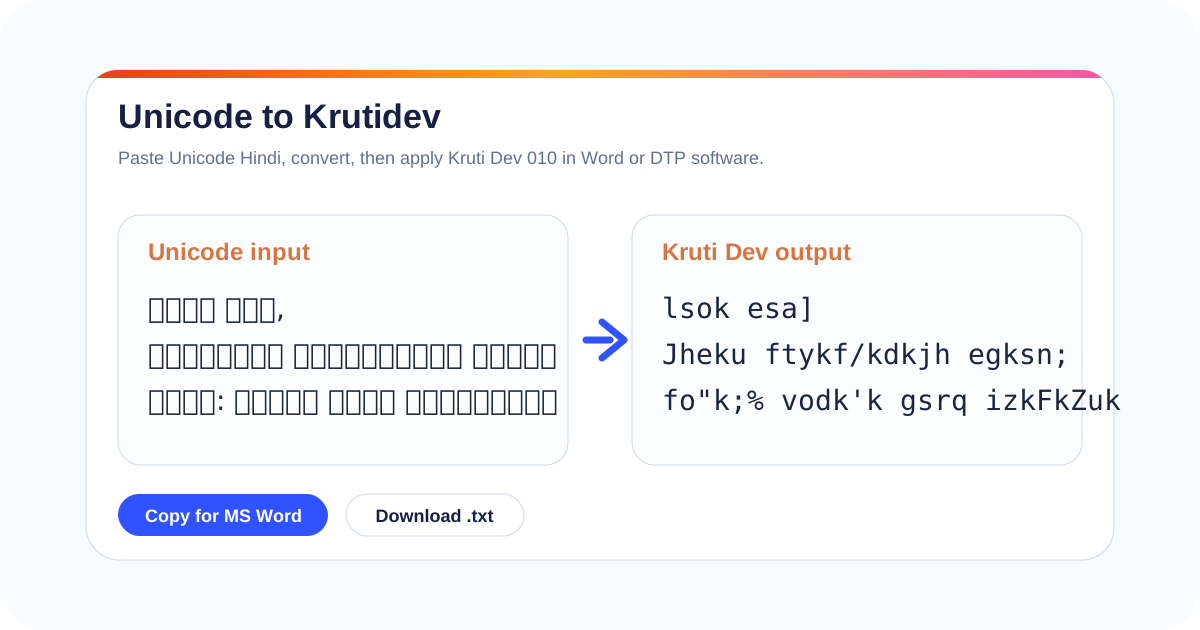
One real before-and-after case, then the four steps that turn a scrambled file into clean Hindi.
4 steps
The four-step recovery procedure
- Locate the source intact. Pull the original from its native container, an old .doc, a scanned-then-OCR'd archive page, a forwarded email, or a 1990s records export. Copy the affected passage whole; partial selections that cut a conjunct in half recover badly.
- Paste into the left panel. Drop the scrambled Latin-looking text into the input box at the top of this page. You are feeding it the raw legacy bytes, so you do not need the Kruti Dev font installed for this to work.
- Copy the recovered Unicode. Read the right panel. Use Copy Unicode for documents and Word, or the plain Copy button when the destination is chat, email, or a website editor.
- Verify names, dates, and conjuncts. Spot-check proper nouns, every date, and the 3 hard conjuncts क्ष, त्र, and ज्ञ against the original. These four classes carry the most legal and factual weight and are exactly where a variant mismatch shows up first.
A typical 300-word circular takes well under a minute end to end. This krutidev to unicode converter online is free, with no install and no sign-up, and it handles plain kruti dev 010 to unicode as readily as longer mixed passages, so a single pass on a phone or an office laptop returns clean, searchable Devanagari ready for web, email, and search.
Case notes: what wrecks a recovery
Six recurring failure signatures from real recovery work, each with the cause and the corrective step. These are the limitations to watch before you trust an output.
Output is still Latin gibberish
The source is not Kruti Dev 010. With more than a dozen members in the family, each holding glyphs in slightly different byte slots, a 010 pass over an 011 or 016 file returns nonsense. Re-read the file properties or ask the print shop that set it, identify the true variant, then run it again.
The i-matra lands on the wrong letter
Kruti Dev draws the i-matra (ि) to the left of its consonant visually, while Unicode stores it after the consonant logically. Recovery reorders this for you, but a long word stacked with nested matras can still need one manual read before you trust it in a name or heading.
क्ष, त्र, ज्ञ split apart
Hindi forms hundreds of conjuncts, and these three carry the most weight in names and technical terms. Kruti Dev encoded them as fixed glyph pairs; Unicode rebuilds them through halant shaping. After every recovery, scan these conjuncts wherever a person, place, or legal term appears.
Danda turns into a pipe or slash
The Hindi danda (।), double danda (॥), rupee mark, and Devanagari numerals occupy different byte positions than their Unicode equivalents. Check sentence ends, numbered clauses, citations, and any monetary figure, since a danda silently becoming "|" is easy to miss on a quick read.
A bilingual file comes back garbled
When a document mixes Kruti Dev Hindi with plain-font English, feeding the whole block through can drag the already-correct English through the Devanagari remap and corrupt it. Separate the Hindi runs from the English runs before recovery, or repair the English afterward.
Word re-mangles the pasted Unicode
If the destination document still defaults to a Kruti Dev font, Word can re-skin your clean Unicode the moment you paste it, making good text look broken again. Select the pasted Hindi and set the font explicitly to Mangal, Nirmala UI, or any Unicode Devanagari face.
Primary sources behind this chart
The public encoding and script references used to verify every claim about Devanagari code points and Kruti Dev behaviour.
Unicode Devanagari block (U+0900 to U+097F)
The Unicode Consortium's official Devanagari chart defines every vowel, consonant, matra, halant, and danda a recovered Hindi file must map onto. It is the target every conversion is measured against.
Unicode Devanagari chart (unicode.org)Devanagari script structure
Devanagari is an abugida whose vowel diacritics and stacked conjuncts explain why a wrong-variant pass corrupts conjuncts and matras first. Knowing the structure is what lets you verify क्ष, त्र, and ज्ञ with confidence.
Devanagari on WikipediaHindi language and encoding history
Hindi is written by hundreds of millions of people, and its move from legacy ASCII-mapped fonts to Unicode is the backdrop to every recovery. A krutidev to unicode converter is the bridge across that shift, which is why so many pre-2005 documents still need one pass before they read correctly again.
Hindi on Wikipedia