पुरानो नेपाली फाइलका लागि
What preeti to unicode actually recovers
The preeti to unicode tool reads old Preeti Nepali typing and rebuilds it as real Unicode you can put on a website, open on a phone, search in Google, or drop into Word. It is free, with no sign-up and no limit. प्रीतिमा टाइप गरिएको पुरानो नेपाली फाइल फेरि पढ्न मिल्ने बनाउँछ। You paste the scrambled-looking text, the readable Nepali appears beside it, and from there the recovered file behaves like any modern document, no Preeti font required.
Most people open the tool because an old Nepali file suddenly looks wrong on a new computer or phone. The fastest way in is to match the symptom you see to its cause and fix. Every card below is one of the recovery situations readers most often hit, from district office clerks to newsroom archivists. In each one a preeti to unicode converter is doing the same quiet job: turning the keystrokes the old font hid back into letters a modern phone can read on its own.
Six symptoms, and the fix for each
Find the symptom your old Nepali file shows, read why it happens, and do the fix. These are the cases that never paste cleanly on the first try.
Problem: Nepali shows as English everywhere
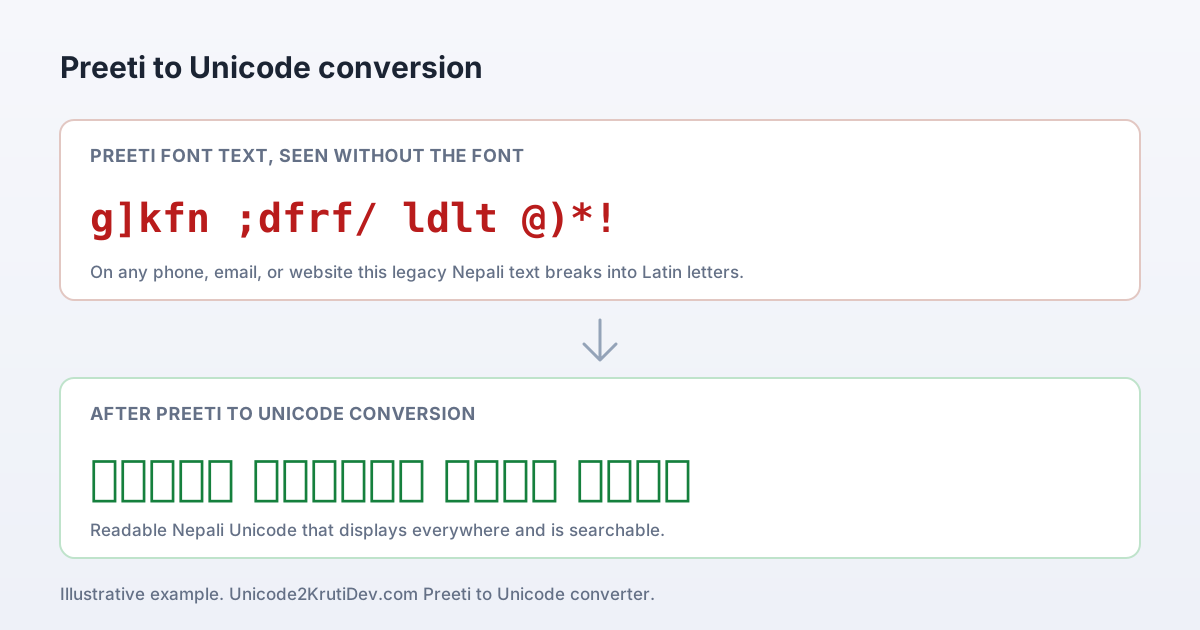
If the file reads as g]kfn or ;dfrf/, it holds Preeti keystroke bytes and the Preeti font is not installed on this device. Paste the whole thing into the input box; the readable Nepali Unicode appears beside it, then copy that out. Nothing is corrupted, the device is simply printing the raw bytes.
Only part of the text turned into Nepali
Common in a mixed file: it carries Preeti alongside plain English names, dates, and figures. That is correct behaviour, English words and numbers were never Preeti, so leave them and recover only the Nepali parts, then rejoin everything.
Common issue: text copied from a PDF
PDF copy adds stray line breaks and re-orders glyphs before you ever paste, so the input arrives messy through no fault of the recovery. Clean the obvious broken spacing in the input box first, then recover; fix the source spacing rather than the Nepali output.
Matras or half-letters sit wrong
Preeti encodes इ, ई, र् and stacked conjuncts across 2 to 3 key positions, and a damaged source loses that order. Recover, then read those specific letters against the original line by line before you trust a name or legal term.
You need the result for a website or app
Preeti is invisible to browsers, search, and most phones; only Unicode is portable. Recover to Unicode once and reuse it anywhere, this is exactly the job Unicode was built for, so the same text drops into any CMS or social post. One trip through a preeti to unicode converter is usually all an archive needs before it stops depending on a single installed font to stay readable.
You are not sure the file is even Preeti
Kantipur, PCS Nepali, and Sagarmatha look almost identical on screen but share Preeti's ASCII layout. Paste it anyway; these related families recover the same way, and a clean Nepali result confirms the family. Because the byte map is shared, the same preeti to unicode converter handles Kantipur or PCS Nepali text without any change of setting.
data versus display
Why a preeti to unicode pass is the only real fix
One idea explains every symptom above, and it is also why a font swap never works where recovery does.
A Preeti file does not store Nepali letters at all. It stores English keystroke positions, the same 26 keys your fingers pressed, and the Preeti font paints a Nepali shape over each. Data and display are two separate things, glued by that one font.
The glue holds on the office machine where Preeti is installed. The instant the file moves, by email, to a phone, into a browser, onto a government portal, the font is gone and the raw keystrokes show through. That is when you see g]kfn instead of नेपाल. Nothing is corrupted; the device just reads the bytes literally. This is why changing the font in Word never fixes the file: it repaints one screen while the stored data stays in the old keystroke form.
What Unicode stores instead
Unicode stores the actual character, राष्ट्र, as code points in the Devanagari block U+0900 to U+097F, 128 positions defined by the Unicode Standard since version 1.0 in 1991. So the letter is the letter on every device. To convert preeti to unicode is to rewrite that data from keystroke positions into true Devanagari, which is why the result reads correctly on the roughly 90 percent of phones with no Nepali font, in search, and in any Unicode font. Recovery fixes the data; a font change only fixed one screen.
Where a recovered file still needs your eyes
Preeti packs Nepali Devanagari onto about 90 ASCII positions, fewer than the 128 Unicode provides, so a few letters carry more ambiguity. Stacked conjuncts and the half-forms Preeti splits across 2 or 3 key positions are where a damaged source can drift. For a chat message this never matters; for a citizenship record, a court notice, or a published name it does, so recover those in blocks of 200 to 300 words and read the conjuncts and matras against the original first.
The preeti to unicode recovery, step by step
- Paste the broken-looking Nepali into the input box above, or type it on the Preeti keyboard if you only have a printout.
- The readable Nepali Unicode appears beside it as you go. There is no convert button to press and no length limit.
- Copy the Unicode out, or download it as a Word or text file for an archive.
- Use it anywhere, a site, an email, a form, a phone message, or a Word document in any Unicode font. No Preeti install needed.
- For anything official, read names, dates, numbers, and matras against the original before you submit or publish.
What this is checked against
The public standards behind Nepali Devanagari on the modern web. Unicode defines the 128 code points of the U+0900 block; Nepali is written in Devanagari, the same script as Hindi; Preeti is one legacy font layered on the ASCII keystroke positions. Every recovery a preeti to unicode converter performs is measured against these published charts, so a restored archive maps onto real Devanagari rather than a guessed approximation.